
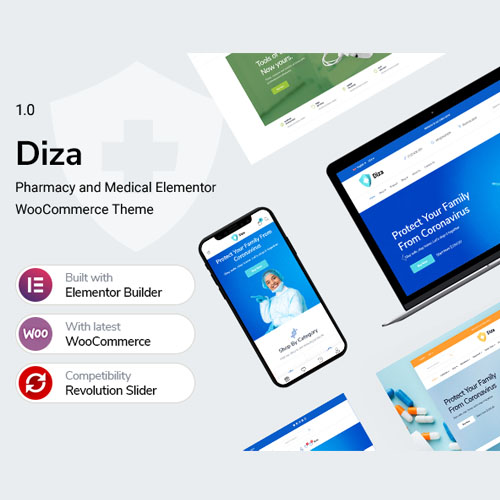


Diza by WooCommerce is a pharmacy store Elementor WooCommerce theme built to help you launch quickly. It includes demo content, flexible page layouts and mobile-friendly design, so your site looks right on every screen from day one.
Who it is for
- Clinics, hospitals and private practices.
- Dentists, therapists and specialists.
- Health and wellness businesses that take appointments.
Diza features
Its main features are health blog supports customer education and, •pharmacy focus limits use for non-health and •prescription features may need additional verification.
- Health blog supports customer education and
- •pharmacy focus limits use for non-health
- •prescription features may need additional verification
- Product categorization for medications
- Prescription upload and inquiry section support
- Product information displays with dosage and
- Health brand and manufacturer showcase pages
- Professional medical-grade design with clean aesthetics
Tips for getting the most from Diza
Show your services, doctors and opening times clearly and add an appointment form near the top of the page; patients usually decide within seconds whether to call or book. Replace all demo text and images with your own before launch, so your site does not look like every other site using the same design.
What you get with Diza
This Diza GPL download is the original WordPress theme from the developer, not a modified or nulled copy.
- The original, unmodified WordPress theme file (version 1.3.23).
- Last updated: 2026-11-16.
- Scanned for malware before upload.
- Licensed under the GPL, so you can use it on as many of your own or client sites as you like.
- Instant download from your MyCodeLive account and future updates listed on our changelog.
How to install Diza
- Download the zip from your MyCodeLive account. If it contains several files, unzip it first and use the theme zip inside.
- In WordPress go to Appearance → Themes → Add New → Upload Theme, choose the file and activate it.
- Install the required plugins the theme recommends.
- Import a demo (if you want one), then replace the sample text and images with your own.
Related downloads
If you use Diza, you may also like FOX – Currency Switcher Professional for WooCommerce, Kera – Fashion Elementor WooCommerce Theme and Avada Theme | Responsive Multi-Purpose Theme. See all WooCommerce products or browse more eCommerce.
Frequently asked questions
Is this the original Diza file?
Yes. We distribute the original, unmodified files under the GPL licence, and every file is scanned for malware before it is uploaded.
Will I get updates?
Yes. We update our files regularly and list new versions on the changelog. With a MyCodeLive membership you get every update for all products without buying again.
Does it include a licence key or official support?
No. GPL copies do not include the developer's licence key or official support, so features that rely on the developer's own servers (such as cloud templates or automatic updates from the vendor) may not work.
Do I have to use the demo content?
No. The demo is optional. You can start from a blank site and use the theme's layouts and options to build your own pages.
Why buy from MyCodeLive
One small payment ($1.99) instead of a yearly subscription, an original file that is checked for malware, and regular updates. Want everything? Our membership gives you Diza plus thousands of other premium themes and plugins.



Reviews
There are no reviews yet.