

What is Side Tabs – Layered Popups Add-On?
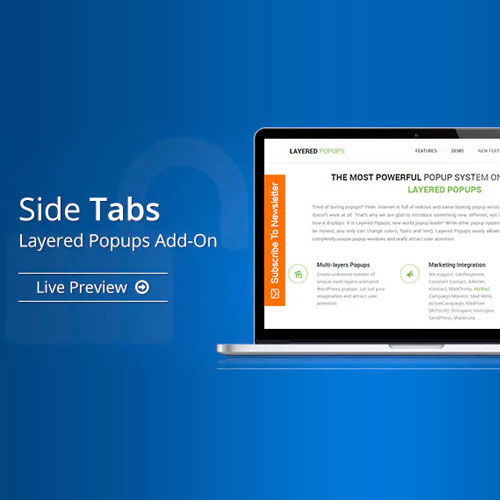
Side Tabs – Layered Popups Add-On is a premium WordPress plugin addon for Layered Popups that introduces persistent edge-docked tab triggers for opening popup content. This functionality enhances user experience by providing non-intrusive access to contact forms and promotional content without interrupting the browsing experience. Key features include customizable tab colors, text, icons, and positions, as well as the ability to create multiple tabs for different purposes. This addon is designed for website owners who want to improve engagement through subtle yet effective calls to action. It is compatible with the latest versions of WordPress and Layered Popups. Available at MyCodeLive with GPL license, instant download, and lifetime updates.
Key Features
Edge-Docked Tabs
Persistent tabs stick to browser window edges for always-visible access
Popup Triggers
Each tab opens a specific Layered Popup with your designated content
Custom Design
Customize tab colors, text, icons, and dimensions to match your site
Responsive Controls
Configure tab visibility separately for desktop, tablet, and mobile
Who is this for?
Pros
- Persistent edge-docked tabs for always-visible CTAs
- Non-intrusive trigger that visitors click when ready
- Customizable tab colors, text, icons, and positions
- Multiple tabs for different purposes simultaneously
- Responsive visibility controls per device type
Cons
- •Requires Layered Popups as the base plugin
- •Edge tabs occupy screen space on smaller viewports
- •Multiple tabs may clutter the screen edges
Product Description
Side Tabs extends the Layered Popups plugin by adding persistent tab elements that stick to the edges of the browser window. Unlike traditional popups that interrupt browsing, side tabs provide a subtle, always-visible trigger that visitors can click when they are ready to engage — opening a Layered Popup with your content.
Core Capabilities
- Edge-Docked Tabs – Tabs stick to the left, right, top, or bottom edge of the browser window
- Popup Triggers – Each tab opens a specific Layered Popup when clicked
- Custom Tab Design – Customize tab colors, text, icons, and dimensions
- Multiple Tabs – Display several tabs simultaneously for different purposes
- Responsive Behavior – Configure tab visibility for desktop, tablet, and mobile
Practical Applications
Common uses include contact form tabs (always-visible “Contact Us” trigger), feedback tabs (“Give Feedback”), promotion tabs (“Special Offer”), and support tabs (“Need Help?”). Side tabs provide a non-intrusive way to make important actions accessible throughout the browsing session.

Reviews
There are no reviews yet.